Compatibility
The Compatibility card was added in version 2.0. Refer to the change log for full release details.
By default, version 2.0 renders your content with browser-standard styling and a flat row structure (<div class="htmlViewerEntry">...</div>). Version 1.x applied some opinionated styling of its own to the visual body, and wrapped each row in a deeper structure - and with the visual's ~7-year legacy, changing how existing reports render without consent would be a problematic migration.
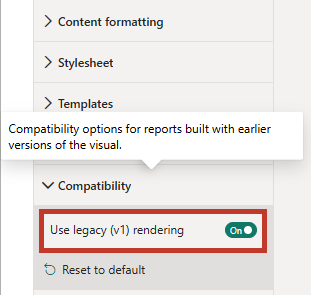
The Compatibility card therefore holds a single toggle - Use legacy (v1) rendering - which renders content exactly as version 1.x did. You should rarely need to touch it, because the visual classifies itself on first render:
- Freshly added visuals start with the toggle off, and use the modern defaults described above.
- Visuals migrated from v1.x (data already bound when 2.0 first renders) get it turned on automatically - the report keeps rendering exactly as it did before: same styling rules, same row structure.
The decision is stored in the report the first time it is opened in edit mode, and from then on the toggle behaves like any other property - flip it to move a migrated report onto modern rendering, or to give a new visual the v1.x behavior (e.g. when following older examples).
Legacy Styling Rules
Version 1.x bundled the W3.CSS framework. As a side effect, W3.CSS's element-level rules silently styled rendered content in every v1.x report - most visibly:
img { vertical-align: middle }- images stacked flush, with no baseline gap beneath them.line-height: 1.5on all text (vs. the browser default of ~1.2-1.4).- Headings (
<h1>-<h6>): not bold (weight 400), fixed pixel sizes (36/30/24/20/18/16), 10px vertical margins, Segoe UI. a { color: inherit }- hyperlinks in the body text color, not browser blue.border-boxsizing on every element, plus<hr>,<code>/<pre>, and<sub>/<sup>normalization.
Version 2.0 no longer ships W3.CSS, so with the toggle off (the default), content picks up browser-standard defaults instead - stacked images gain a small baseline gap, headings are bold at browser sizes, and links are browser blue.
With the toggle on, the v1.x rules above are reapplied - at the lowest possible CSS specificity, so anything in your Stylesheet property overrides them, exactly as it did in v1.x.
Row Structure
By default, each row renders as a single element: <div class="htmlViewerEntry">...</div>. Legacy rendering restores the v1.x two-level structure - <div class="htmlViewerEntry"><div>...</div></div> - so stylesheets written against it (e.g. selectors like .htmlViewerEntry > div) continue to match.
An authored Row template always takes precedence over the default row structure, whichever mode is active.
Good to Know
- Reset to default on the Compatibility card is intentionally a no-op for rendering: the visual immediately re-stores the mode it was already using (the stored marker doubles as the migration flag, so it must not be silently lost).
- Works in every edition; report viewers are unaffected (the classification never writes while a report is simply being viewed).